Introduction:
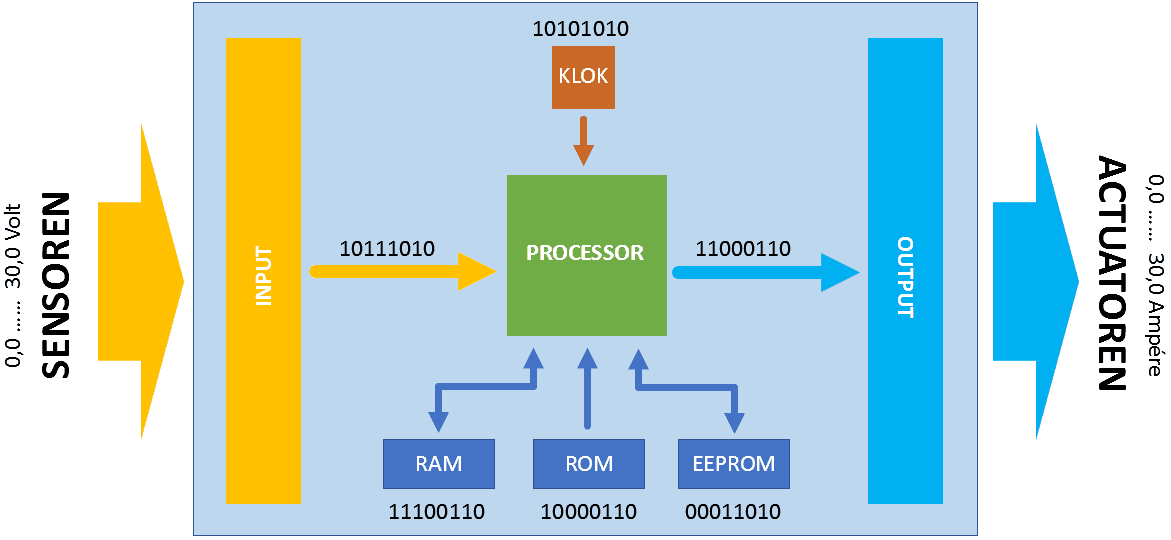
An ECU receives i.e. measurement data from sensors, processes the information and performs calculations to control the actuators. The image below shows a block diagram of a control system.
Sensors are pickups that respond to a physical quantity. The electronics in the sensor convert this into an electrical signal. The ECU receives this electrical signal as “input” and compares this signal with the pre-programmed value. Depending on what the signal is used for, control takes place by adjusting the actuator control.
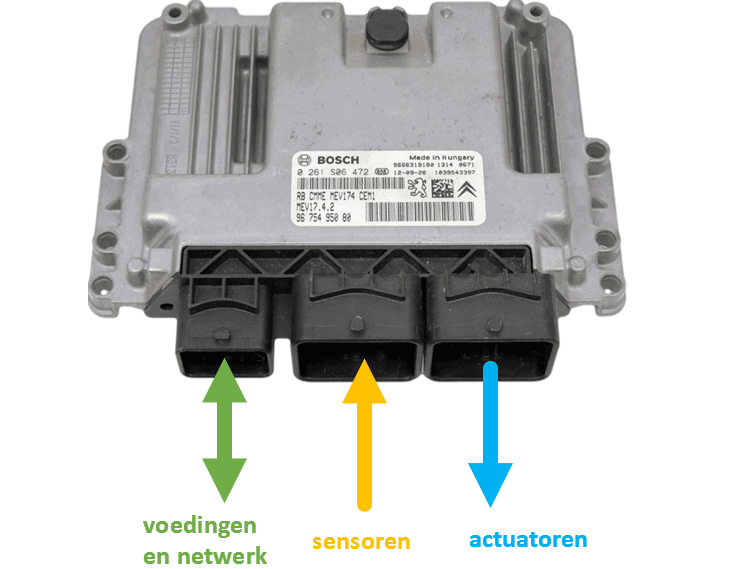
The following image shows an ECU with three connector connections. From left to right: power supply and network, sensors, actuators.
In a petrol engine management system we find, among others, the following sensors:
- crankshaft position sensor to measure the crankshaft speed;
- coolant temperature sensor to measure the warming of the coolant;
- throttle position sensors to measure the position of the throttle valve and thus the engine load;
- MAP or air mass meter to measure the vacuum or air flow;
- lambda sensor to measure the oxygen content in the exhaust gases;
- the barometric sensor and intake air temperature sensors;
- knock sensor to advance the ignition as far as possible.
The above sensors serve as input to control the injectors and ignition coil(s). For this purpose, all sensor values are looked up in a pre-programmed map.
As an example, we take the injector control. At idle engine speed, the injectors inject a certain number of degrees after TDC.
- At a low coolant temperature, the injection duration is extended (enrichment);
- During gentle acceleration, the injection duration is also extended. A measurement is also taken that records how quickly the accelerator pedal is pressed: during abrupt full throttle, additional enrichment is provided;
- The vacuum in the intake manifold influences the injection timing and duration;
- The lambda sensor (for example the switching sensor) measures whether the mixture is too rich or too lean. If the mixture is too lean for a number of crankshaft rotations, the injection duration is extended using the fuel trims until the mixture is stoichiometric again;
- The barometric sensor and intake air temperature sensor measure the air pressure and temperature to determine the oxygen level in the intake air.
The injection duration therefore depends on the values of as many as five sensors. In modern engines, even more sensors play a role in this.
During and after controlling an actuator, the sensors feed information back to the ECU. The measured value is compared in the software with the desired value. This determines whether an actuator control can remain constant, must be shortened, or extended. The ECU therefore acts as a controller, creating a control loop.
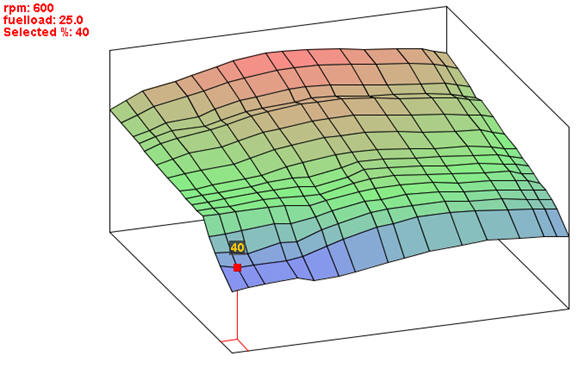
The following image shows a map, in which the basic injection time is determined from the crankshaft speed in relation to the vacuum in the intake manifold, which is a measure of the engine load. The temperatures and lambda sensor form a correction factor and each have their own map.
System bus:
The system bus makes connections between the components in the ECU (see the image below). At the top of the ECU we find the clock. This so-called oscillator emits a square wave with a frequency of usually 16 mHz. The clock frequency determines the speed of the control unit. The components in a control loop are synchronized by this timer.
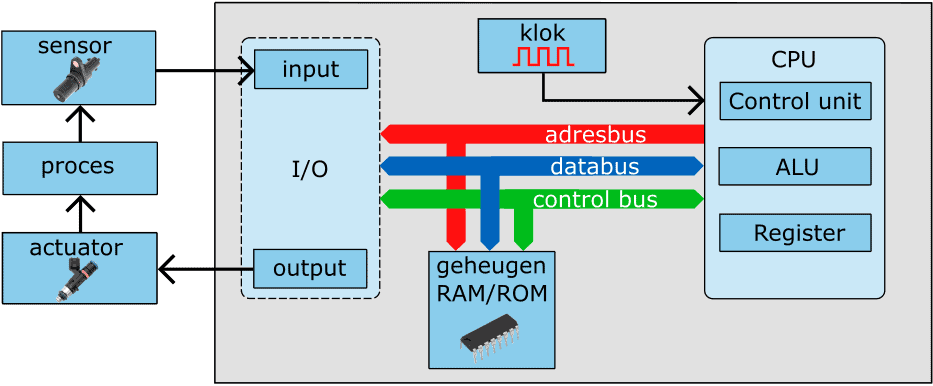
The CPU, the memory and the I/O interface (I/O stands for: input / output) are interconnected with a system bus, consisting of multiple connections on the circuit board. We can subdivide these into:
- address bus: this bus ensures data transfer from the microprocessor to specific memory locations;
- data bus: data between the memory, the CPU and the interfaces is transported via the data bus;
- control bus: serves as control by performing read and write selections, requests and resets based on the timing of the system clock.
Processor (CPU):
The processor (Central Processing Unit) forms the heart of the computer. The combinatorial circuits, which consist of an enormous number of AND, OR and NOT gates, are built in the ECU by means of software. During the manufacture of the processor, a number of instructions (the software) are embedded. These instructions perform actions and put them in the correct order. Example:
- the letters of the alphabet are stored digitally in the processor. In reality it will not be letters, but digital instructions that represent simple actions;
- by putting the letters in the correct order, we can make words;
- by putting the words in the correct order, we can make sentences;
- the sentences make the story: in reality the computer program.
The program to put the instructions known by the processor in the correct order is embedded in the software by the programmer. This program is loaded into the flash memory of the ECU.
When the ECU is started, the instructions are retrieved one by one from the flash memory by the processor and executed, in step with the clock. After the program has been executed and has ended, the cycle starts again.
The data needed to load information such as the ignition timing is loaded from the ROM memory. The processor starts from the ROM memory and copies data from ROM to RAM. After startup the CPU retrieves all data and commands from the fast RAM memory. A relatively small RAM memory is necessary for the temporary storage of data and calculated intermediate values.
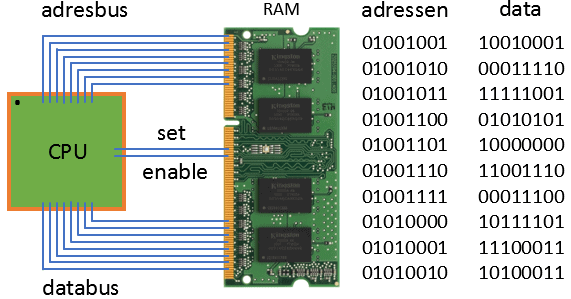
The CPU is connected to the memory via an address bus and data bus.
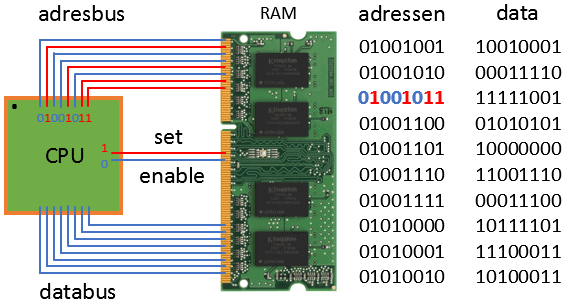
- Set: bits are stored in the RAM
- Enable: bits are retrieved from the RAM
Bits and bytes of data in the RAM memory can consist of:
- numbers: data from sensors / data to actuators / calculations
- addresses of sensors (input) and actuators (output)
The data in the RAM memory can be:
- letters: ASCII codes, numbers, letters, symbols
- instructions: instruction set of the processor (commands for processor)
The processor works according to an ISA (Instruction Set Architecture) or an instruction set. The ISA is a list of instructions that has been programmed by the manufacturer and is used by the processor. The ISA is different for each processor and is highly dependent on the application for which the processor is used. Below are some examples:
- LOAD the processor retrieves a value from the RAM memory
- STORE the processor stores a value in the RAM memory
- ADD the processor adds two numbers together
- CLR the processor clears a value in the RAM memory
- COMPARE the processor compares two numbers with each other
- JUMP IF the processor jumps to a specific memory address in RAM (condition from compare)
- OUT the processor sends information to an output
- IN the processor requests information from an input
To be able to run a processor at full clock speed, internal RAM memory is used. These are called “registers”. Registers are particularly important functional blocks in many digital systems. They consist of a collection of flip-flop circuits that can temporarily hold a binary number (thereby remembering it). The different types of registers are:
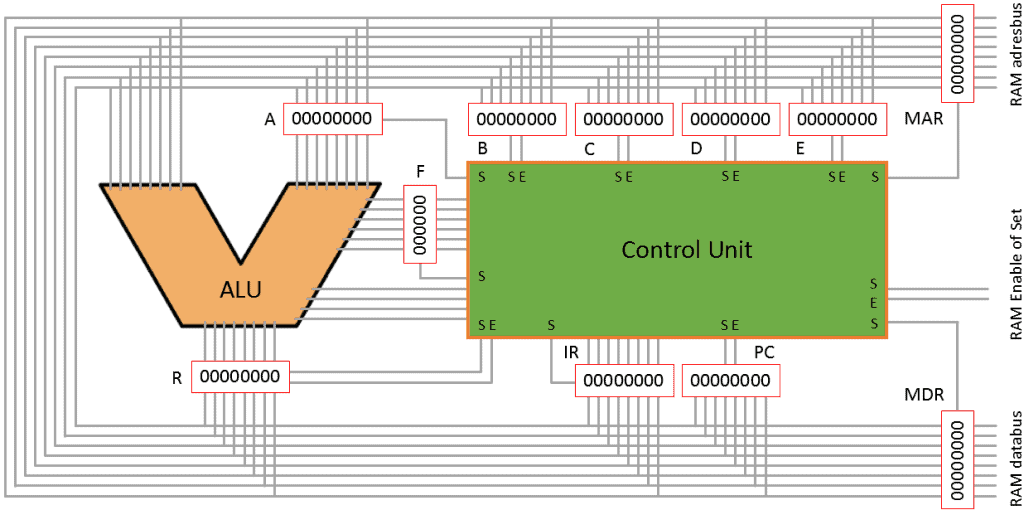
- A register: register for A input to ALU
- B register: register for B input to ALU
- Working register: general purpose, for storing (intermediate) results
- Instruction register: the current instruction to be executed for the processor is stored in this
- Address register (program counter): contains the address of the next instruction to be executed
- Flag register: number (after a calculation) is: zero, negative, positive, too large, even or odd
- Floating Point Register: number with digits after the decimal point
- Shift register: memory in which the data shifts one bit during each clock pulse
- Memory Data Register: buffer between CPU and RAM for memory data
- Memory Address Register: buffer between CPU and RAM for memory address
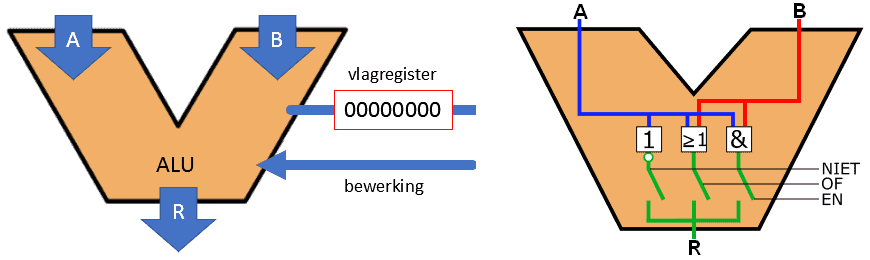
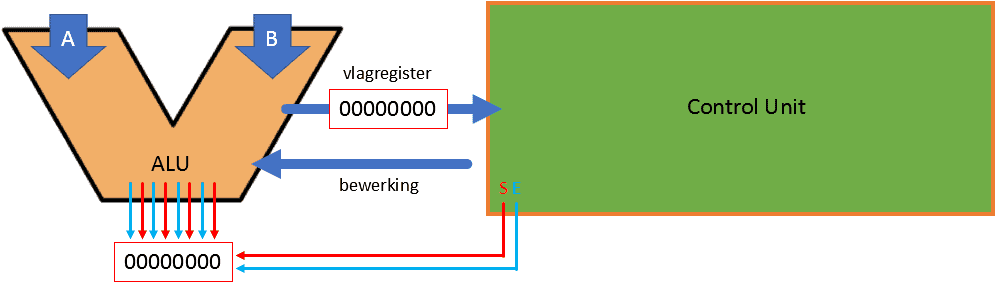
The ALU (Arithmetic Logic Unit) performs all arithmetic operations and logical operations (AND, OR, NOT, etc.).
- 2 inputs to ALU: A and B
- 1 input: which operation the ALU must perform
- 1 output: R (Result) goes to a register
- 1 output: flag register
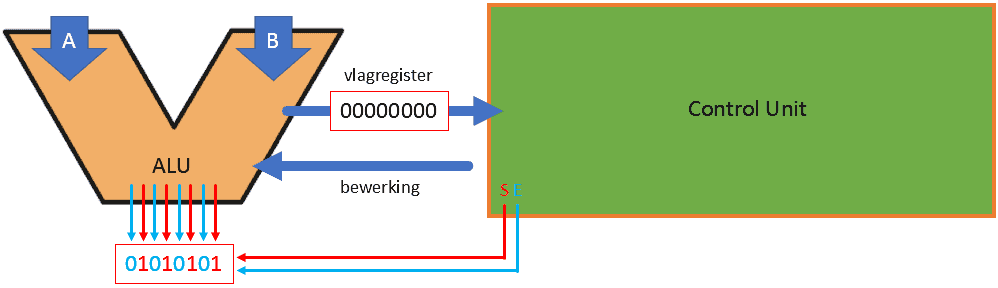
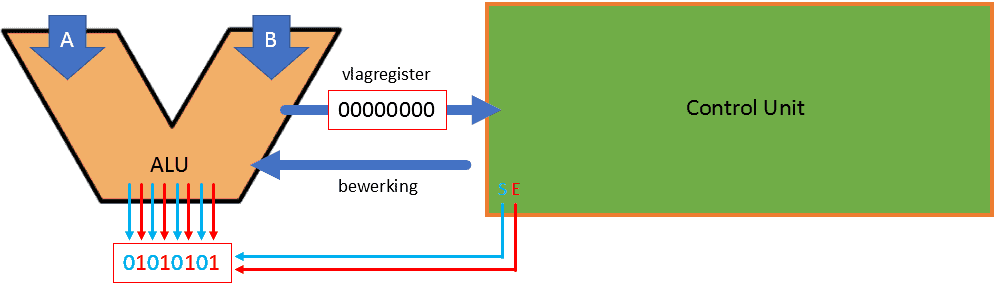
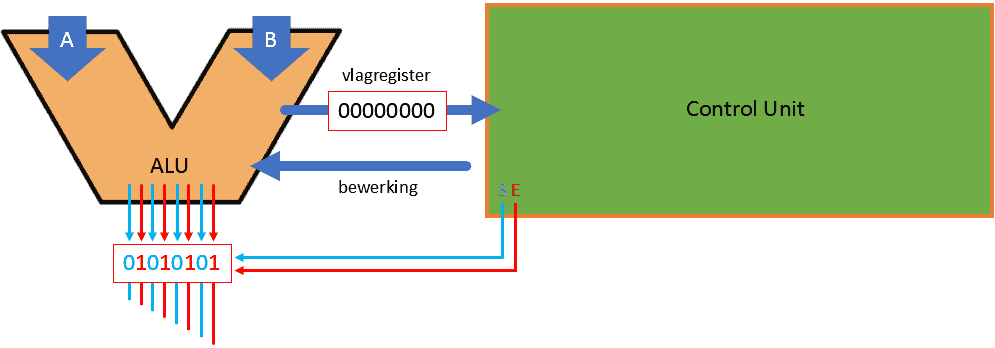
1. The ALU wants to send 01010101
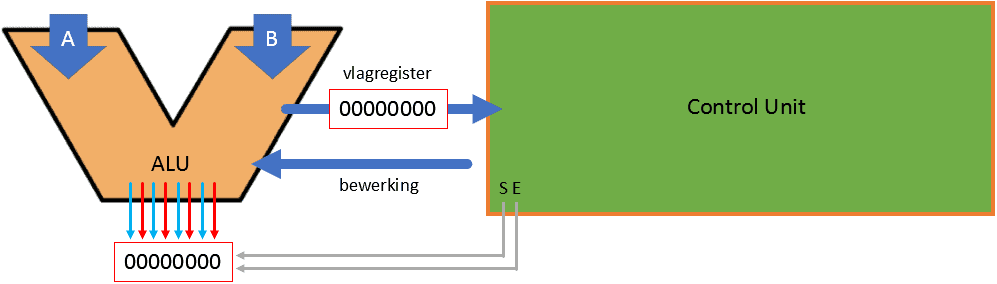
2. First the Control Unit must make set “1”
3. The register is filled in
4. Then Enable is set to “1”.
5. The data from the ALU is put on a bus
RAM memory:
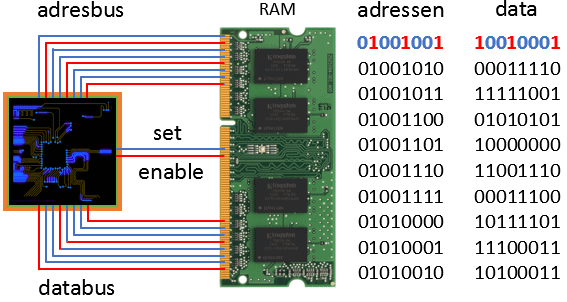
The CPU wants to retrieve data from the RAM memory. This happens in the following steps.
1. CPU sends an address to the RAM (01001001)
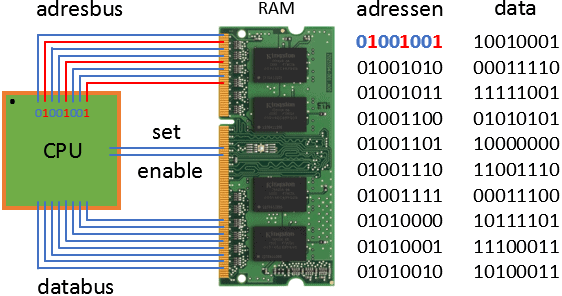
2. CPU wants to receive information; “enable” = 1
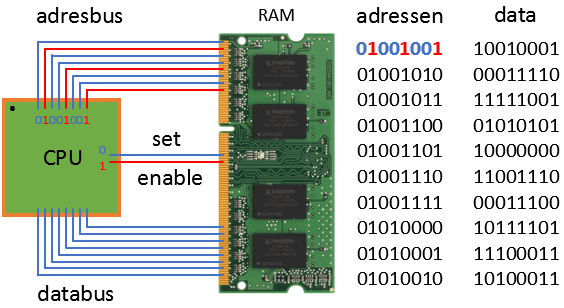
3. RAM sends data from address 01001001 to the CPU
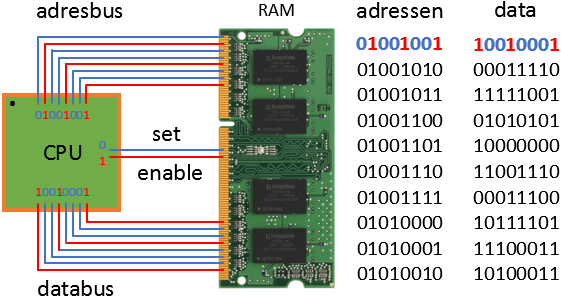
4. CPU processes the information
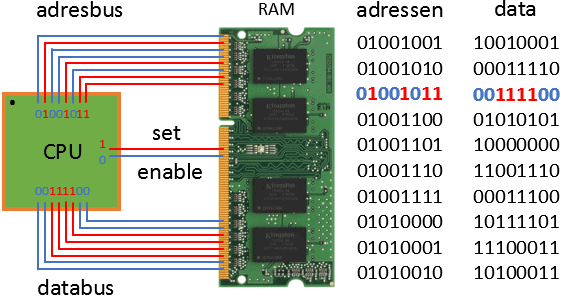
The CPU wants to store data in the RAM memory:
1. CPU sends an address to the RAM (01001011)
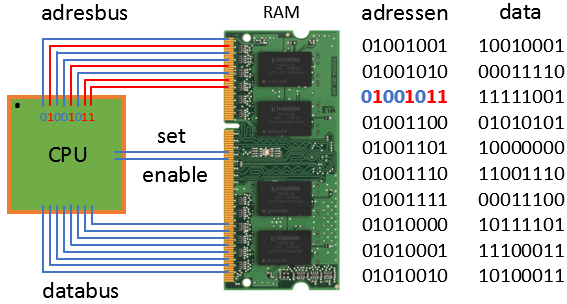
2. CPU wants to store information; “set” = 1
3. De CPU stuurt data (00111100) naar adres 01001011 in het RAM.
De data in het RAM wordt nu overschreven van: 11111001 naar: 00111100
ROM-geheugen:
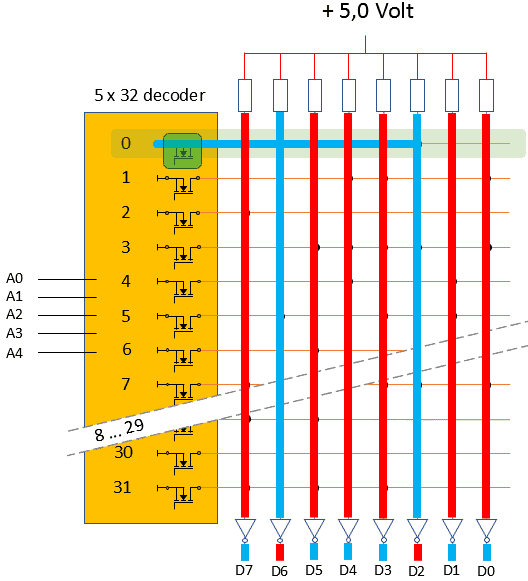
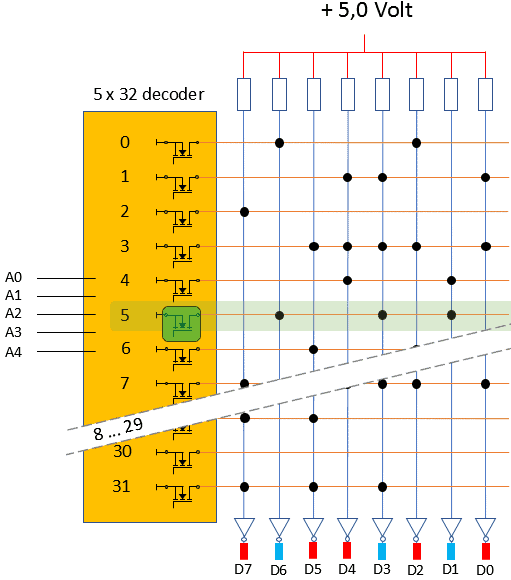
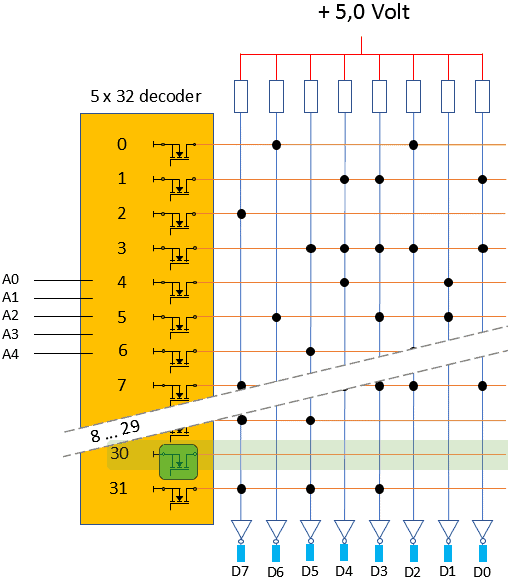
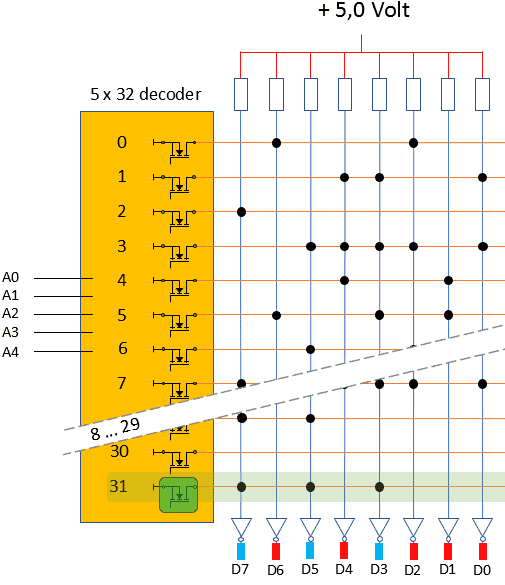
ROM is een afkorting van: Read Only Memory. Dit geheugen is door de fabrikant geprogrammeerd. Het geheugencircuit is opgebouwd met vaste verbindingen. De ECU start vanuit het ROM-geheugen het softwareprogramma (booting). Het ROM-geheugen is een traag geheugen. Tijdens het opstarten wordt de data vanuit het ROM naar het RAM gekopieerd.
Hieronder volgen vier voorbeelden van het uitlezen van het ROM.




Gerelateerde pagina’s: