Topics:
- Introduction
- Multiple networks in a car
- CAN network with the control modules
- CAN bus signals
- Speeds and voltage levels
- Structure of the CAN bus message with a (standard) 11-bit identifier
- Structure of the CAN bus message with an (extended) 28-bit identifier
- Math channel and serial decoding
- Fault detection using bit stuffing and CRC & ACK delimiters
- Twisted pair wiring
- Termination resistors
- Gateway
- CAN bus diagnostics
Introduction:
Modern vehicles are full of electronics. The control units collect and process data from sensors and control actuators. Often, different ECUs use the same data: the accelerator pedal position sensor records the position of the accelerator pedal. This signal is sent directly via the wiring to the engine ECU. The engine ECU is not the only ECU that uses this signal:
- The engine ECU uses the signal from the accelerator pedal position sensor to control the throttle body, to command the injectors longer during acceleration enrichment when accelerating, to adjust ignition timing, and possibly to control the wastegate or VGT adjustment of the turbo;
- The automatic transmission ECU uses the accelerator pedal position to determine the clutch shift timing in the automatic transmission. If the accelerator pedal is pressed slightly, the automatic transmission will upshift at a lower engine speed than if the accelerator pedal is pressed halfway. By suddenly pressing the accelerator pedal quickly, “kickdown” will be activated by shifting to a lower gear and allowing the engine to rev higher;
- The amount of throttle input in a corner can be a reason for the ESP ECU to intervene by reducing engine power and possibly squeezing the brake on a slipping wheel.
During an ESP intervention, engine power decreases by (partially) closing the throttle body and injecting less fuel. In addition, an indicator lamp in the instrument cluster will illuminate or flash to alert the driver that the ESP is intervening.
The above already clearly shows the cooperation between different ECUs. The CAN bus ensures that ECUs communicate with each other and can exchange data. CAN is an abbreviation for Controller Area Network.
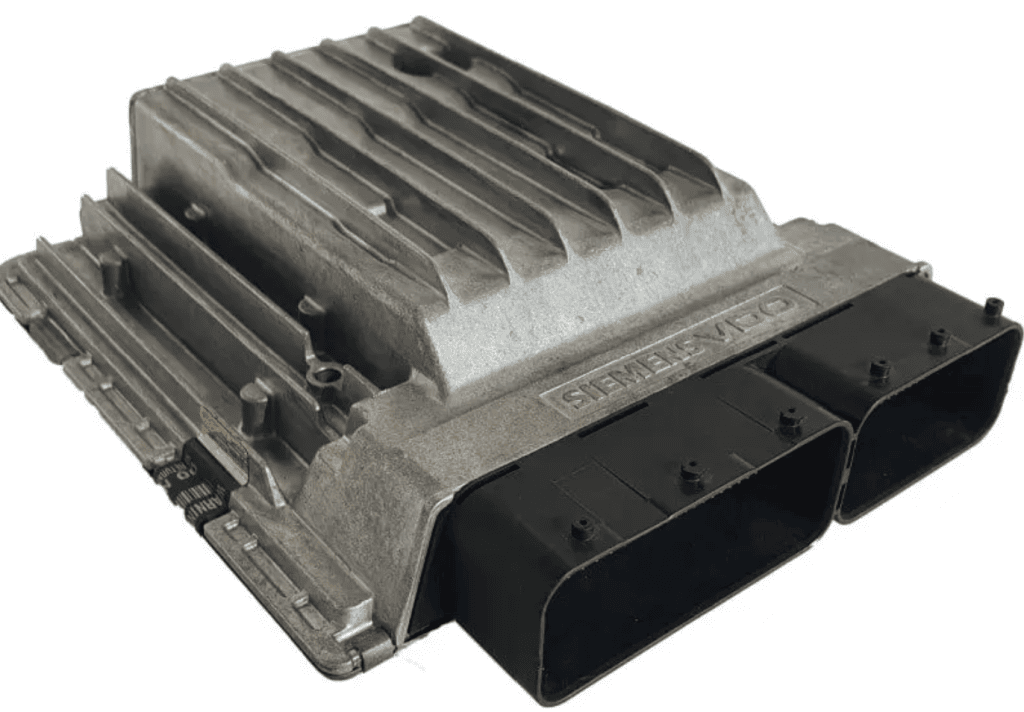
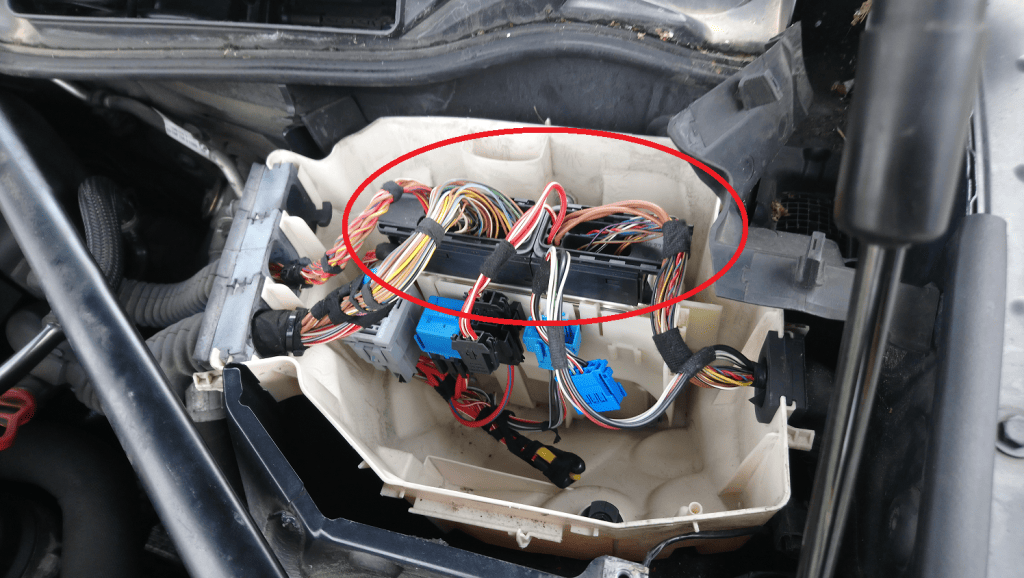
In the 1980s, cars received more and more accessories and manufacturers began installing control modules. Each function got its own wire. As a result, wire gauge and the number of connector connections increased significantly.
Thick wiring harnesses have the disadvantage that routing them behind interior trim is difficult, and the chance of faults increases considerably.
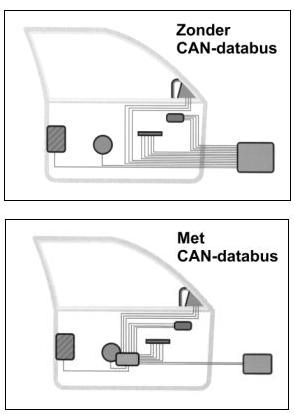
With the CAN bus, ECUs communicate using only two wires: CAN high and CAN low. All communication between the ECUs is carried over these two wires. In the next two images, it is clearly visible that the number of wires in just one door already decreases considerably when using the CAN bus.
Dozens of control modules can be connected to the two CAN bus wires on the CAN bus. All connected control modules can exchange data with each other.
The image below shows a vehicle with eleven control modules (indicated by the red blocks). These control modules are all connected to each other with two wires: an orange wire and a green wire. These wires represent CAN high and CAN low. Each control module has its own function and, by means of the CAN bus, can communicate with any other control module in the network. More in-depth information about the control modules can be found on the page control modules.
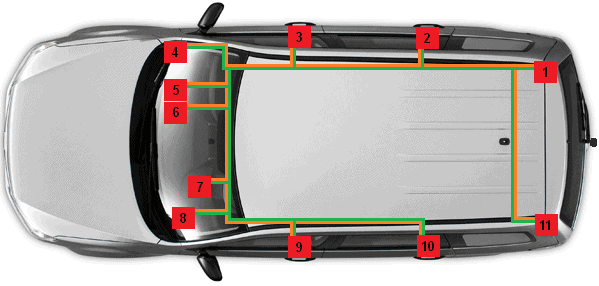
1. Trailer hitch control module
2. Door control module R.R.
3. Door control module R.F.
4. Gateway
5. Comfort control module
6. Alarm system control module
7. Instrument cluster
8. Steering column electronics control module
9. Door control module L.F.
10. Door control module L.R.
11. Park Distance Control module
With the arrival of the CAN bus, EOBD has also become more extensive. EOBD stands for European On-Board Diagnosis. EOBD is related to emissions. Various sensors of the engine and exhaust send information to the ECU. If there are incorrect values (for example because poor combustion is taking place), a MIL (Motor Indication Light) will illuminate. That is a sign that the car must be scanned. A diagnostic tester must then be connected to the OBD connector to read out the faults. Based on the fault, the ECU has stored a hexadecimal fault code, which is displayed by the diagnostic tester as a P-code or as a fault with text (the latter is more brand-specific). Click here for more information about OBD1, OBD II and EOBD.
Multiple networks in a car:
A car can contain multiple networks. The image below shows an overview with legend of control units in multiple networks of a BMW 3 Series E90.
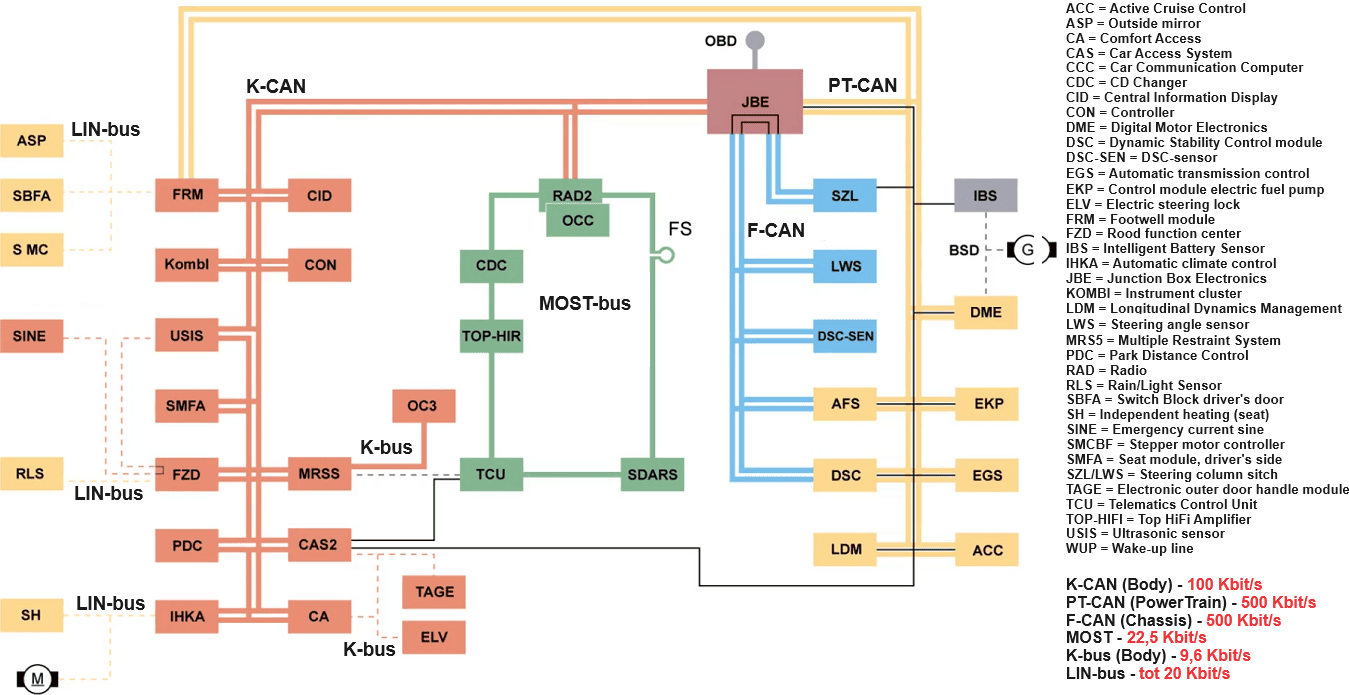
The K-CAN, PT-CAN and F-CAN networks in the image above fall under the CAN bus. The differences are the speeds, the associated voltage levels, and the applications. The Powertrain CAN and the F-CAN do have the same high-speed speed and voltage levels, but the difference is that the PT-CAN is used for engine and transmission control, and the F-CAN contains the chassis control units.
CAN network with the control modules
The CAN bus network consists of control modules equipped with hardware and software to receive, process, and transmit messages. For data transfer, a CAN high wire and a CAN low wire are used. In the image below, CAN high is colored red and CAN low is colored blue.
The control modules (also called control units or nodes) are connected to these wires. All control modules can both send and receive information. An example of a network is the CAN bus system in the vehicle interior; here, various control modules can be connected to one bus system.
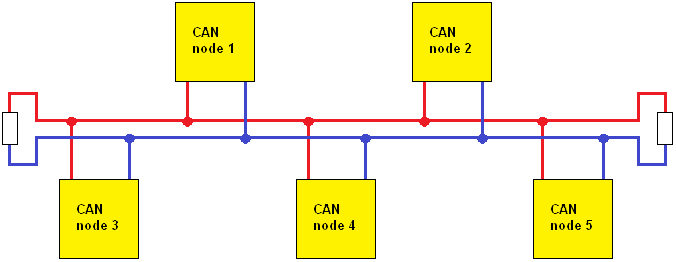
As an example, we take a backup camera (node 5) that is retrofitted. This camera is installed at the license plate holder or handle. The CAN wiring is connected in the interior at any location. The condition is that the camera node contains the correct identifier (pre-programmed by the manufacturer) because the other control modules must be able to recognize it. If the camera is registered to the supported radio, the image is immediately visible.
After programming the software, the radio receives a signal from the transmission that reverse gear has been selected. At that moment, the radio switches to the image from the backup camera. When first gear (forward) is selected, the image switches off again. All of this is thanks to data transfer by the CAN bus system.
Unsupported equipment (with, for example, an incorrect identifier) can cause problems. If it transmits messages that are not recognized by other control modules, a fault message will be generated. This type of equipment can also cause the CAN bus to remain active after the ignition is switched off. The car then does not go into “sleep mode,” causing the battery to drain quickly. This is a parasitic drain.
CAN bus signals:
The CAN bus system uses the broadcast principle; a transmitter puts a message on the CAN bus. Every node on the same bus receives the message. However, in the message the transmitter indicates for which nodes the message is intended. All nodes receive the message and then provide their feedback (more on that later). The nodes for which the message is not intended recognize this and ignore it.
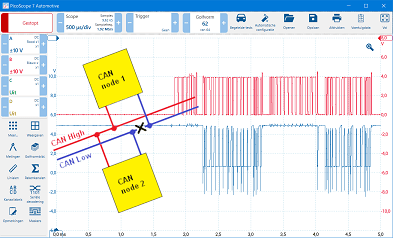
A CAN bus signal consists of a CAN high and CAN low voltage. In the image below, CAN high is shown in red and CAN low in blue. The high and low signals are identical, but mirrored. When the bus becomes dominant, the voltage of CAN high rises from 2.5 to 3.5 volts and CAN low drops from 2.5 to 1.5 volts. In the recessive state (at rest), both voltages are 2.5 volts.
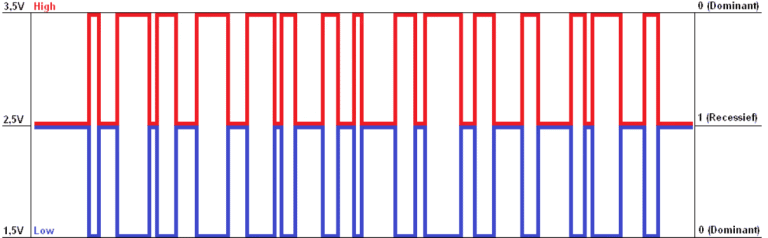
The image above shows an example of a measurement with an oscilloscope. It is clearly visible that both voltages are identical, only mirrored. Ultimately, the voltage difference in the active (dominant) range is 2 volts. This refers to the difference between 1.5 and 3.5 volts. The 2-volt difference is seen as a 0 (dominant) and a 0-volt difference as a 1 (recessive).

If a (transmitting) node wants to transmit the binary code “0 0 1 0 1 1 0 1”, it will apply the stated voltages to CAN high and CAN low (see the example above). The receiving node will interpret these voltages as a binary code and then convert them into a hexadecimal code. The stated binary code will be converted from hexadecimal to 2D.
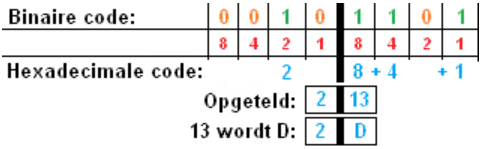
To convert binary to hexadecimal, it is easy to draw a table of 8 boxes with a thick line in the middle. Name the boxes on the right 1, 2, 4, and 8 (see the red numbers in the image). Then do the same on the left side. Write down the numbers that have a 1 of the binary code above them. On the left that is only the 2; on the right those are 8, 4, and 1. Add everything on the right together (13) and do the same on the left (2). Hexadecimal goes from 10 to A, 11 = B, 12 = C, 13 = D. That ultimately makes 2D.
More information about converting binary to (hex-)decimal and vice versa can be found on the page Binary, Decimal and Hexadecimal. It contains clear examples described in detail.
Speeds and voltage levels:
In vehicles, we can encounter CAN bus networks with different speeds:
- High speed: ECUs related to the drivetrain, including engine electronics, transmission, ABS/ESP, EBS (commercial vehicles);
- Medium or low speed: interior electronics such as the instrument cluster, radio, climate control, parking brake, trailer hitch.
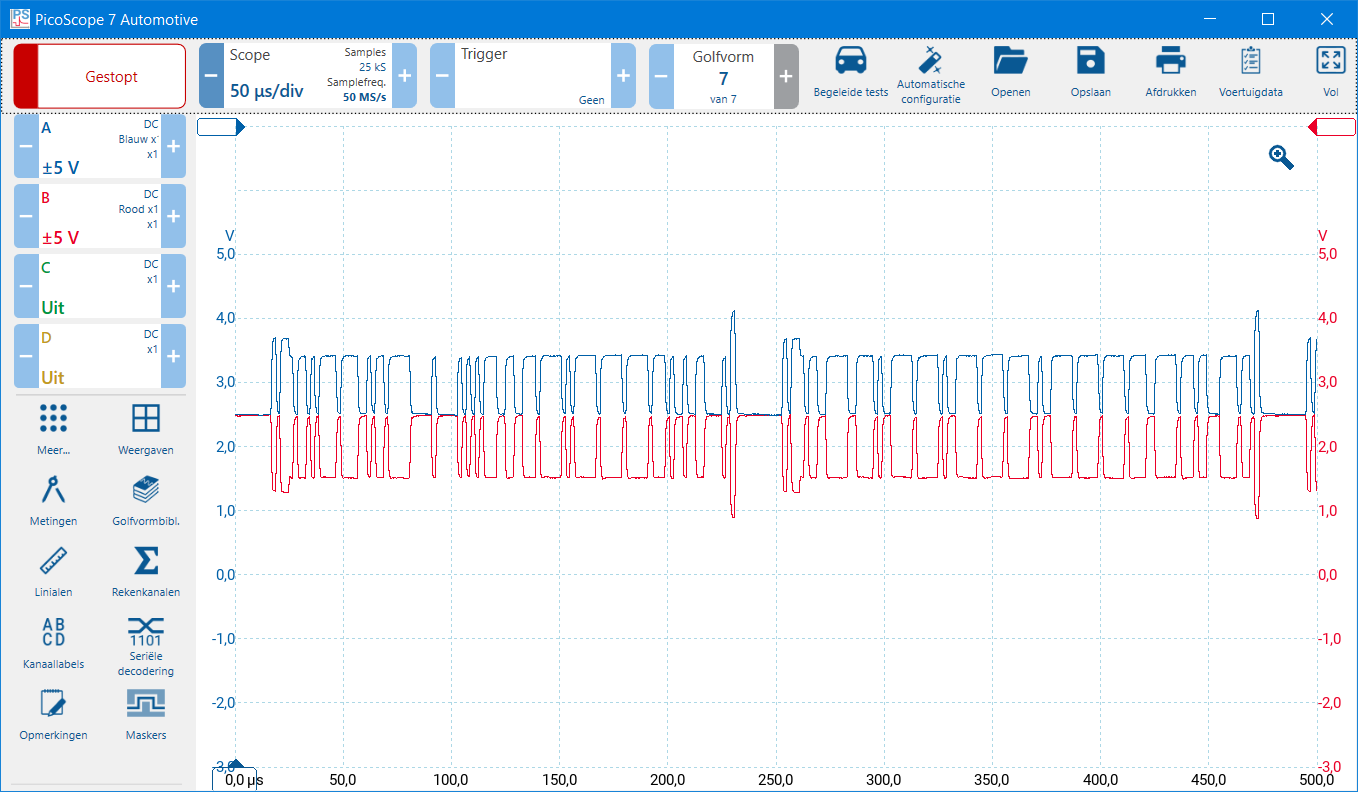
The two images below show the CAN high and CAN low signals of the high-speed CAN bus. At rest, the voltage of both signals is 2.5 volts. To send a message, CAN high rises from 2.5 to 3.5 volts and CAN low drops from 2.5 to 1.5 volts.
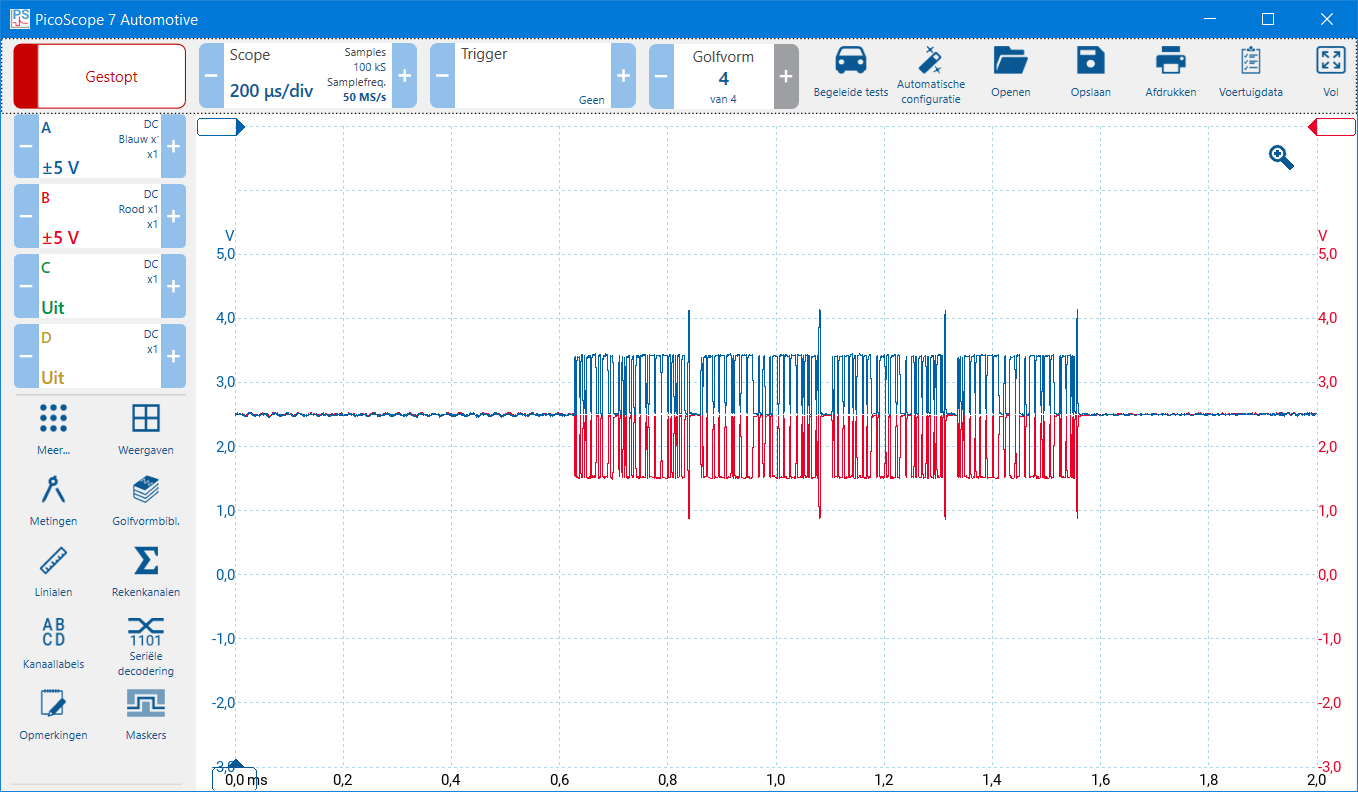
Below, the signal of the CAN high speed is shown again, now zoomed in (50 microseconds per division), whereas the scope in the signal above was set to 200 microseconds per division.
In comfort electronics, the high speed of communication is less important and is therefore implemented at a lower speed. Characteristic of the medium or low speed CAN bus are the voltage levels at rest and when forming a message as follows:
- CAN high is 0 volts at rest (recessive) and rises to 4 volts (dominant) to transmit a bit;
- CAN low is 5 volts at rest (recessive) and drops to 1 volt to transmit a bit.
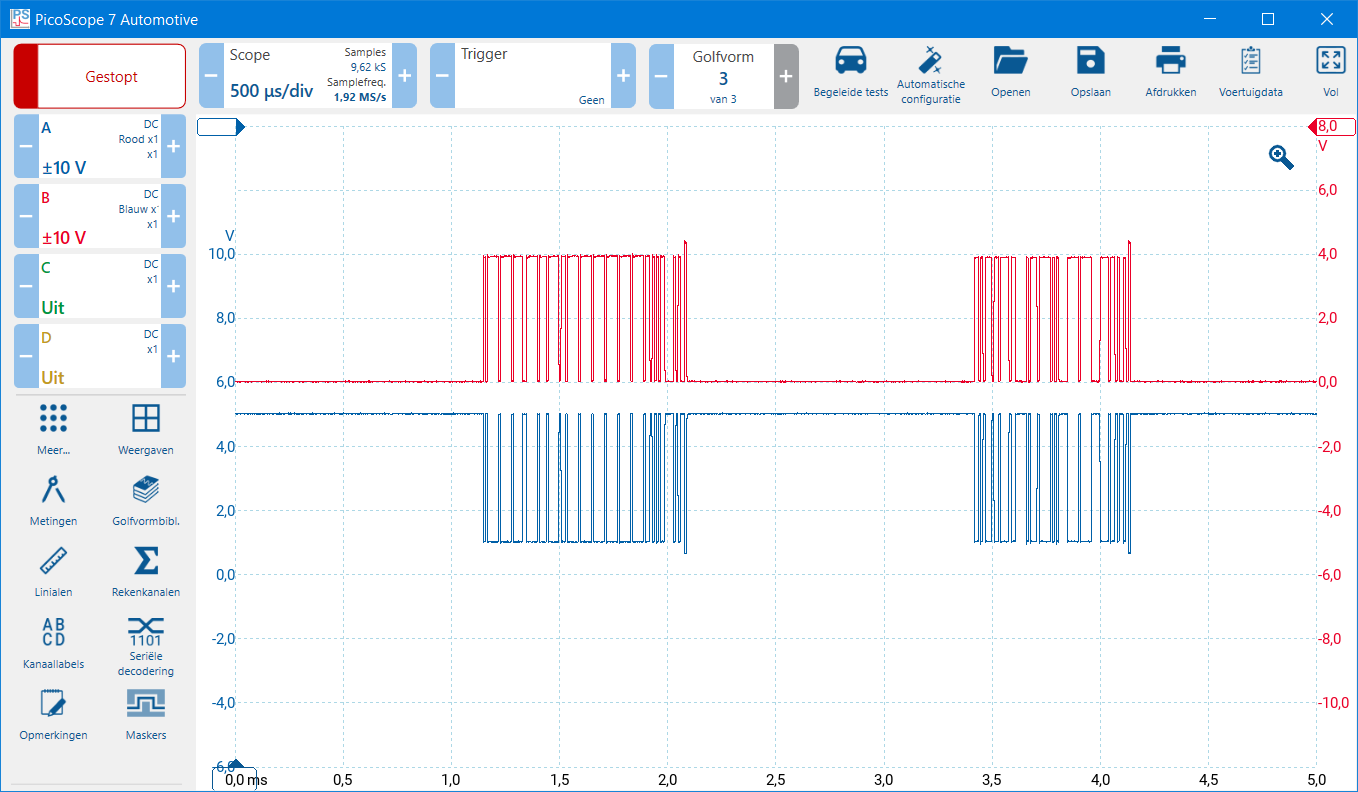
In the measurement where the zero lines of channels A and B are set at the same height, you can see that the voltages have been “pushed into each other.” This makes reading the signal quality of the CAN high and low signals difficult. The image below shows the oscilloscope display with high and low:
- CAN high (red) rises from 0 to 4 volts
- CAN low (blue) drops from 5 to 1 volt.
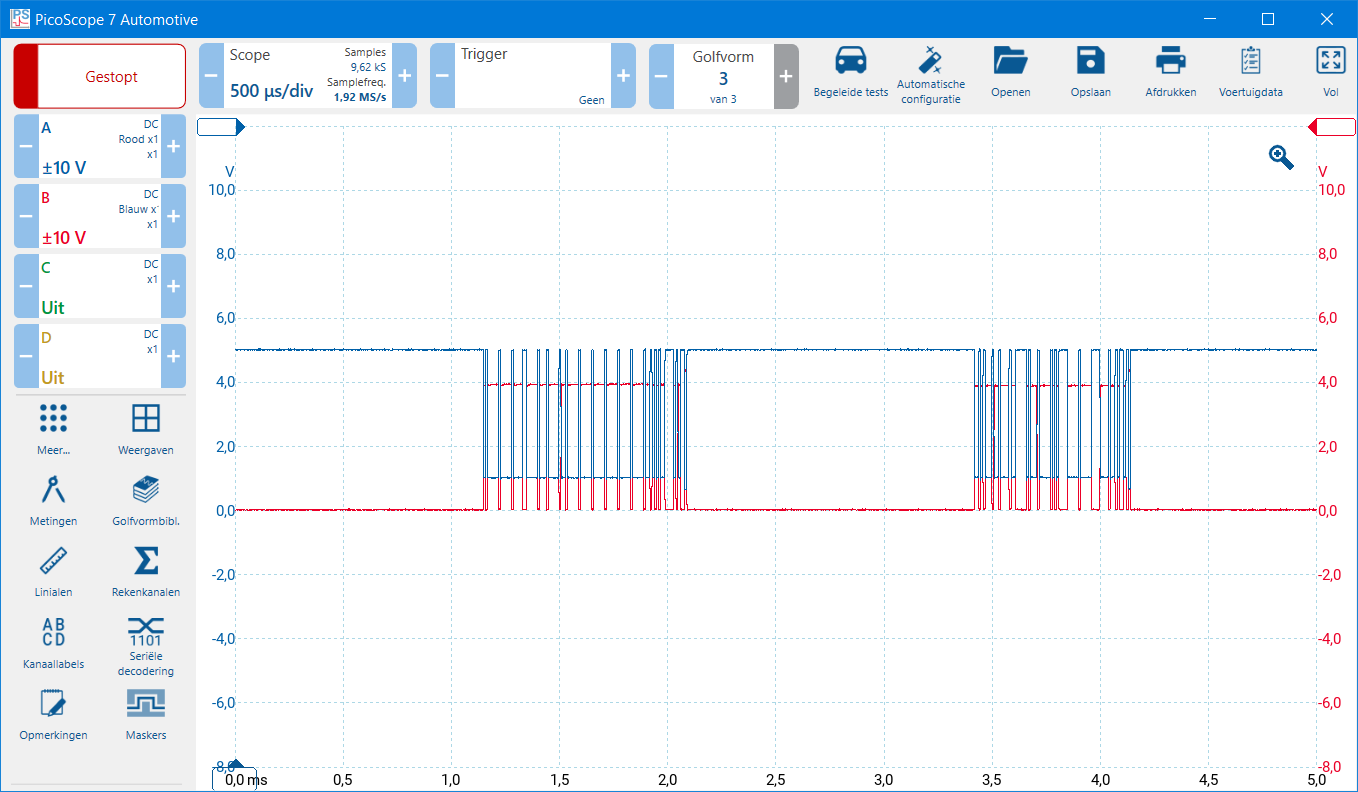
To assess the signal quality of the messages, it is recommended to shift the zero lines. In the image below, the zero line of channel A has been shifted down and that of channel B shifted up. This separates the displayed signals and shows a clearer voltage pattern.
Structure of the CAN bus message with a (standard) 11-bit identifier:
The structure of a CAN bus message is always based on the image below. There are differences within the structure; for example, the ARB and the CTRL field of an 11-bit identifier and a 29-bit identifier are different. The information below relates to the 11-bit identifier. For reference: a 29-bit identifier has room for more data than the 11-bit. More on this later.

The structure of the message is now summarized simply and will be described in detail later:
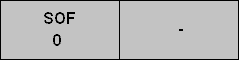
SOF:
Each CAN message begins with an SOF (start of frame). When a node wants to start transmitting a message, a dominant bit is placed on the bus. The CAN bus is always recessive at rest (a 1, so both CAN high and CAN low are 2 volts). The dominant bit (a 0) indicates that other nodes must wait to transmit a message until the entire message has been placed. Only after the IFS (Interframe Space) may the next node start transmitting its message. Even if it is an important message, it cannot cut in.
When 2 nodes want to transmit a message at the same time (without knowing it) and thus together make the bus dominant by placing a 0, the ARB (arbitration) determines which message has priority.
From here on, for each part of the CAN bus message discussed, that section will be added to this gray image. In that way I try to keep an overview. The message started with the SOF.
ARB:
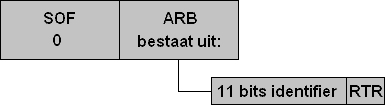
The arbitration field of an 11-bit identifier consists of two parts: the identifier and the RTR bit.
Suppose two nodes make the CAN bus dominant simultaneously. The node with the less important message then waits until the more important message has been fully placed (until after the IFS). The identifier of the message contains a sequence of ones and zeros. These values are deliberately assigned to a message by the programmer. An identifier with a 0 in the message (dominant) has a higher priority than an identifier with a 1 in the message (recessive).
The bit value 0 (dominant) always overrides a bit value 1 (recessive). If two nodes transmit at the same time and one sends a 0 and the other a 1, the final bus level becomes 0. The node that sent the 1 notices this difference, stops transmitting, and becomes a receiver. This is how priority on the bus is established.
The animation below with three ECUs shows how the messages with a 1 drop out and how the message with the most zeros from the right-most control module is ultimately allowed to be transmitted.
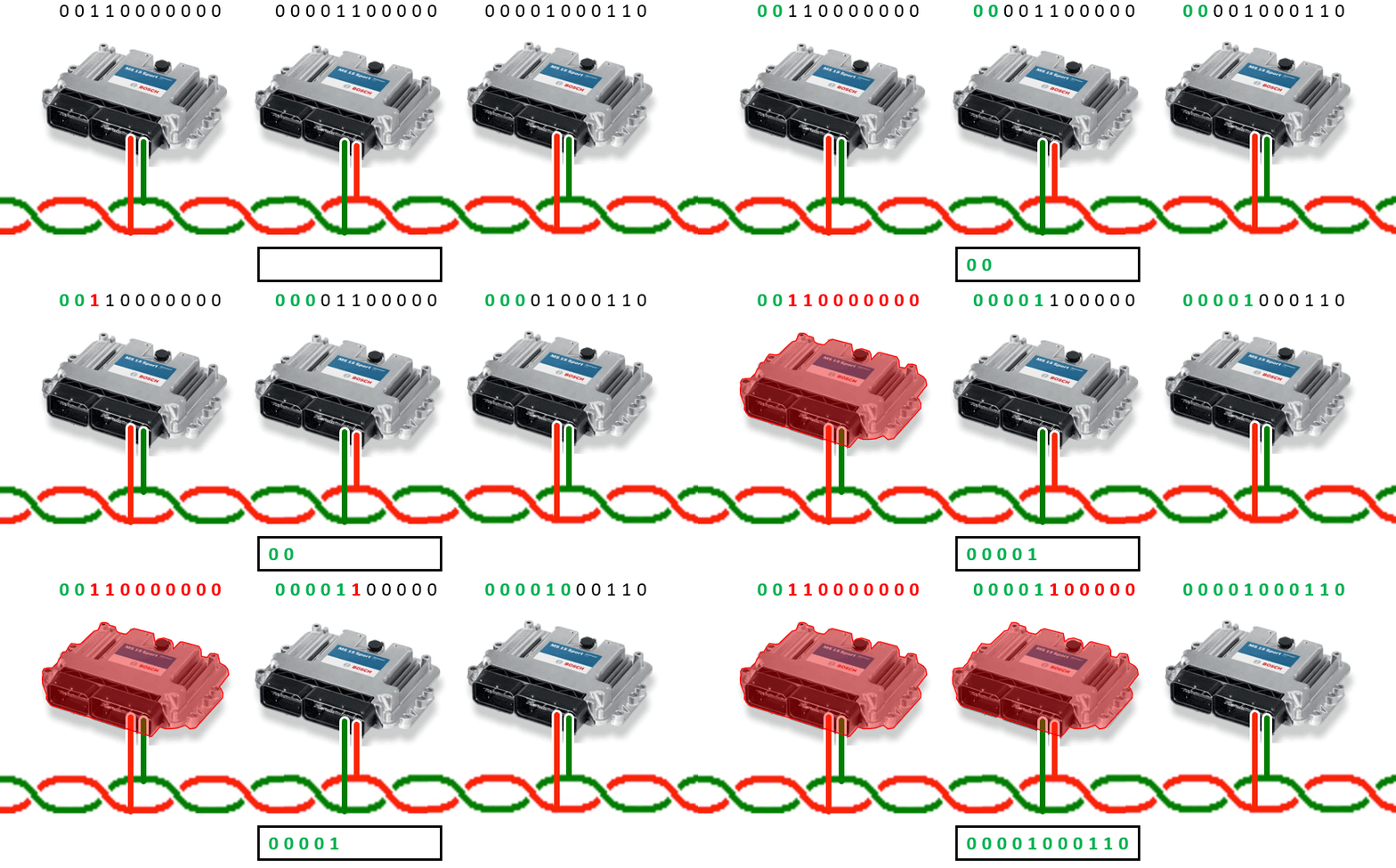
The three ECUs begin by placing an 11-bit message in the identifier. At the SOF, the dominant bit is placed. After that, the first two bits of the three identifiers are identical (0 0). The third bit is a 1 for the second ECU and a 0 for the third ECU. Dominant wins, so ECU 3 places the CAN message. The two ECUs whose bits were recessive then listen to the entire message and determine whether anything needs to be done with it.
The gray SOF image below is now expanded with the ARB, which consists of two parts: the identifier and the RTR bit.
RTR bit:
The last bit of the 11-bit identifier is the Remote Transmit Request bit (RTR bit). This bit determines whether a CAN frame contains data or whether data is being requested.
0 = data frame (dominant): the message contains data in the data field
1 = remote frame (recessive): the message requests data from another ECU, which will then transmit a data frame with the same identifier
CTRL:
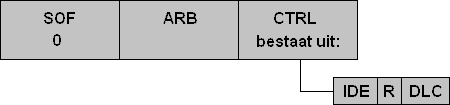
The Control Field consists of the IDE (Identifier Extension), an R bit, and the DLC. The IDE bit indicates whether it is a standard (11-bit) or an extended (29-bit) identifier.
0 = standard identifier (11 bits)
1 = extended identifier (29 bits)
The R bit is reserved for future use and is always recessive in standard frames.
Next comes the DLC. A CAN network can transmit a maximum of 8 data bytes. One byte contains 8 bits, so in total a maximum of 64 bits of data can be transmitted according to the standard protocol. The Control Field indicates how much data is being sent. It does not make sense to transmit a large message with empty data fields for a simple confirmation (for example 1 for on or 0 for off). Therefore, the DLC (Data Length Code) specifies how many bytes of data are included. The DLC is a function in the programming software and is assigned in advance by the programmer.
If the DLC specifies one byte, then 8 bits of data are transmitted. This is sufficient for short confirmation messages. For extensive messages, the DLC will contain a value up to a maximum of 8 data bytes.
The example has been expanded again. The IDE, R, and DLC have been added.
DATA:
In the data field, the actual data to be transmitted is placed. The size depends on the value of the DLC (Data Length Code). It was previously indicated that the DLC can be a maximum of 8 bytes. Each byte consists of 8 bits, so in total the data field can consist of 64 bits.

CRC:
The Cyclic Redundancy Check consists of a mathematical calculation that is sent along with the CAN message. The transmitting node calculates a check value over the message up to that point: SOF, ARB, CTRL, and DATA. This calculation forms the CRC.
When the receiving node has received the message including the CRC, it performs the same calculation over the received part of the message (up to and including the DATA field) and compares the result with the transmitted CRC value. If the values do not match (for example due to an incorrect bit or interference), the message is not accepted and a request is made to retransmit it, with a maximum number of retry attempts.
The example has been expanded with the CRC field.

ACK:
The Acknowledge Field is used for receipt confirmation. When the sender has transmitted the message up to and including the CRC, the ACK slot follows. The sender places a recessive bit (1) on the bus there. If one or more receiving nodes have received the message correctly, they will overwrite this recessive bit with a dominant bit (0). It does not matter how many nodes provide confirmation: one dominant confirmation is sufficient.
Then follows the ACK delimiter, which is always recessive. After that, transmission of the message continues.

EOF:
The End Of Frame consists of 7 recessive bits (1 1 1 1 1 1 1). This is a sign to all control units that the message has ended.

IFS:
To prevent interference, an Inter Frame Space is always applied after the EOF. The IFS consists of 11 recessive bits. All nodes wait until these 11 recessive bits have passed before transmitting a message. After these 11 recessive bits, for example, 2 nodes can again start transmitting a message at the same time. The ARB (arbitration) is then used again to determine which message has the highest priority. The whole cycle then starts again from the beginning.
Structure of the CAN bus message with an (extended) 29-bit identifier:
The 11-bit identifier was designed at a time when vehicles still had relatively few control modules (nodes). It soon became clear that more identifier capacity was needed. An 11-bit identifier provides 2^11 = 2048 possibilities, of which 2032 unique combinations are available for messages. Modern vehicles therefore use the extended 29-bit identifier, called the extended identifier. This allows 2^29 = 536870912 combinations. This offers more than enough capacity, including for future applications.
In a CAN bus message, a number of things change when an extended identifier is used. Both types of identifiers (standard and extended) can coexist. The message therefore indicates which type of identifier it is, after which the rest of the message structure follows.
The basis of the 11-bit identifier remains in place and forms the starting situation. Below, only the parts that differ when a 29-bit identifier is applied are described. The SOF (Start Of Frame) remains unchanged: the transmitting node places a dominant bit when the message is started. After that come the ARB and CTRL fields, where the differences become visible.
ARB:
During arbitration, the standard 11-bit identifier is placed first (the first part of the 29-bit identifier). The RTR bit (which is in this position with the 11-bit identifier) is moved to the end of the ARB field with the extended identifier. In the original place of the RTR bit, the SRR bit (Substitute Remote Request) is now placed. With an extended identifier, this SRR bit is always recessive (1).
After the SRR bit comes the IDE bit. In a standard 11-bit message, this bit is located in the CTRL field. With an extended identifier, the IDE bit is taken out of the control field and placed directly behind the SRR bit in the arbitration field.
For clarification, the images below show the standard identifier (11 bits) and the extended identifier (29 bits).
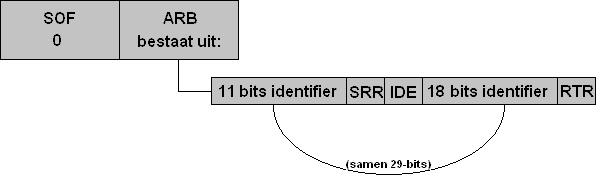
The IDE bit stands for Identifier Extension. The IDE bit indicates whether it is a standard or an extended identifier.
IDE 0 = Standard (11-bit ID)
IDE 1 = Extended (29-bit ID)
After the IDE bit comes the rest of the extended identifier. The 11 and 18 bits together make 29. These cannot be placed as one whole in the message, because then the CAN protocol would no longer be correct. In principle, the IDE bit now indicates that the message is split into two parts.
CTRL:
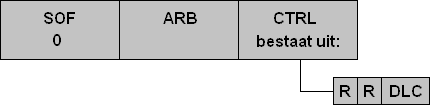
The Control Field is therefore modified for the extended identifier. The IDE bit has been moved to the ARB.
The IDE bit is replaced by an R bit (reserve). This is recessive by default. This is followed by another R bit and the DLC (Data Length Code), which indicates how many bytes the message will consist of.
Now again, the control fields of both the 11-bit and the 29-bit identifiers are shown.
Math channel and serial decoding:
When measuring the CAN bus, the following functions can help analyze the signals: the math channel and serial decoding. Below is the explanation of the math channel. Under the PicoScope screenshot is the explanation of serial decoding.
Math channel:
The math channel performs a mathematical comparison between two measurement channels. When CAN low is measured on channel A and CAN high on channel B, we choose “B-A”. An additional Y-axis with voltage appears on the screen. Below the voltage pattern of channels A and B, we see a voltage from 0 to 2 volts:
- Recessive: B-A = 2.5 – 2.5 = 0 volts
- Dominant: B-A = 3.5 – 1.5 = 2 volts
The math channel helps analyze the signal pattern, even if the measured voltages show some noise. More information about that can be found in the Twisted Pair section.
Below the screenshot is the explanation of serial decoding.
Serial decoding:
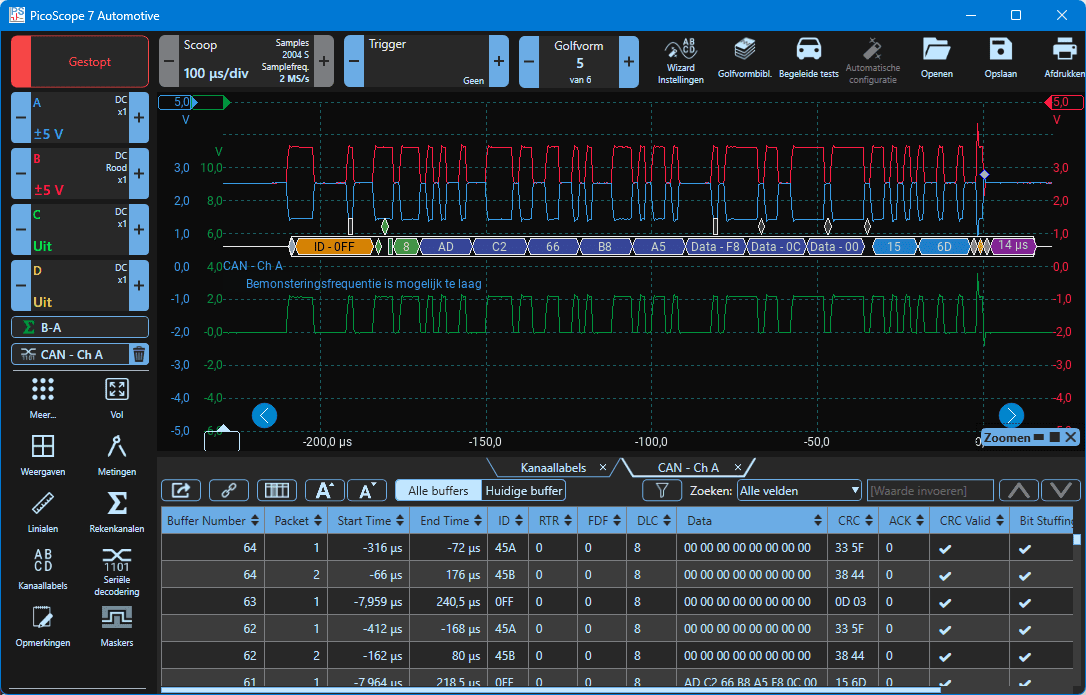
In the left column in the PicoScope software, we find the “Serial decoding” button. After selecting this function, a screen appears with options where the desired measurement channel must be selected (in this example channel A is chosen), and the settings for the baud rate and high or low are shown. The baud rate corresponds to the CAN speed and is usually already set correctly automatically. Under “High or Low” we choose whether we are going to measure CAN high or CAN low. Because channel A is selected and this is CAN low, we choose “Low”. In the next screen, settings can optionally be changed for the display (decimal, hexadecimal), but they can remain as they are.
After confirming, an additional colored bar appears below the voltage pattern, with the decoded data and the hexadecimal data at the bottom of the screen. The colored blocks show the structure of the CAN message. In the scope display, the colors are shown without red messages with crosses, and in the lower data field all texts are blue with a V for valid. This means that the CAN data can be read correctly by the PicoScope software. In most cases, we can therefore assume that the ECUs in the car can also read this data. As soon as the data contains errors, we will see this in the serial decoding with red text and crosses.
Fault detection using bit stuffing and CRC & ACK delimiters:
Bit stuffing:
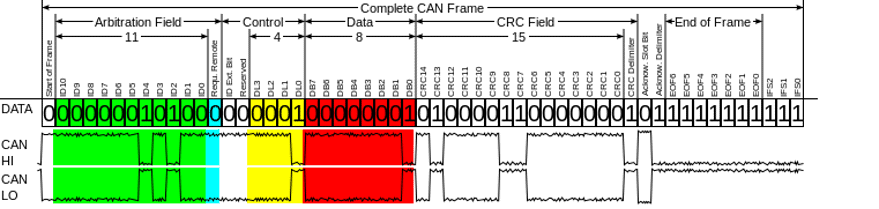
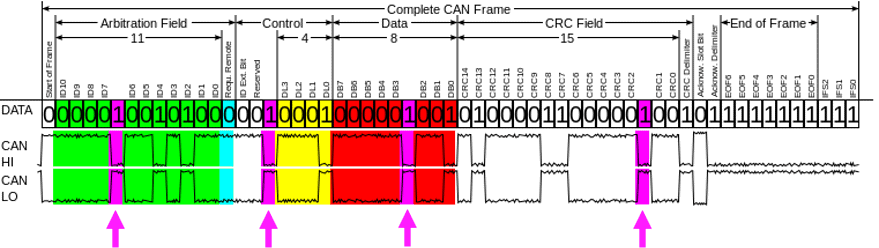
To maintain synchronization between transmitting and receiving nodes, bit stuffing is applied. This means that after five identical bits, an opposite bit is automatically added by the transmitter. This does not change the content of the original data, but an extra bit is inserted.
The receiver recognizes bit stuffing. As soon as five consecutive identical bits have been received, the next (opposite) bit will be removed. This preserves the original bit pattern.
When a message consists of, for example, only ones, the transmitter will insert a zero after each sequence of five ones. This increases the message length, but these extra bits do not count toward the DLC (Data Length Code). The receiver removes the inserted bits again and thus retains the original bit pattern.
CRC & ACK delimiters:
CRC and ACK delimiters are fixed recessive bits that follow directly after the CRC and ACK field, respectively. These bits have a fixed value, so both the transmitter and receivers know exactly what bus state must occur here. If a node detects a different value, this is interpreted as a bit error. The node then marks the message as invalid and generates an error frame. The message is retransmitted later, depending on the error-handling mechanism and the configured protocol layer.
Suppose a CAN message contains the following (fictitious) data field: 1010
The transmitter must now determine a simple check value (CRC). In this example, we use a simple calculation instead of the real polynomial division to make the principle understandable:
Add the numbers together:
1 + 0 + 1 + 0 = 2Convert the result to a binary value:
2 decimal = 10 binaryThis binary value is sent as the CRC after the message:
1010 10
The receiver does the same:
1 + 0 + 1 + 0 = 2 → 10 binary
The received CRC was also 10 → so the message is good.
If a bit error comes in due to noise (for example 1010 becomes 1110):
1 + 1 + 1 + 0 = 3 → 11 binary
The calculated value (11) then does not match the received CRC (10). The receiver now knows there is an error in the message.
This example shows the basic principle:
The CRC is a check value that the receiver uses to confirm that all bits remained the same during transmission. In reality, the calculation is much more extensive and accurate, which allows multiple bit errors at once to be detected.
Twisted pair wiring:
Twisted pair wiring is used as cabling for the CAN bus. The CAN high and CAN low wires are twisted (braided) around each other, as shown in the image. Because both wires continuously swap position due to the twisting, they receive virtually the same interference signals from outside. This keeps the voltage difference between CAN high and CAN low stable. This form of interference suppression is called common-mode noise rejection and is an important advantage of twisted-pair wiring.
The CAN bus also works differentially. This means that the absolute voltage on one wire is not decisive, but the voltage difference between the two wires. With a dominant signal, CAN high rises and CAN low drops, which increases the voltage difference. If interference affects both wires at the same time, this difference remains virtually the same and the signal remains readable.
In vehicles, many current-carrying cables run close to sensitive data lines. Without twisted pair, electromagnetic induction could easily cause voltage spikes or bit errors on the CAN line. By using twisted pair, the CAN signal remains reliable, even with strong external interference signals or long cable runs.

Suppose both wires (CAN high and CAN low) run straight and parallel next to each other and are not twisted. Interference signals from outside then create induced voltages in the wiring. In that case, these induced voltages act in the same direction, creating a large voltage difference compared to the original signal.
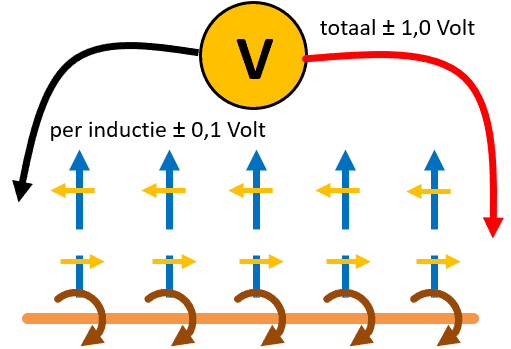
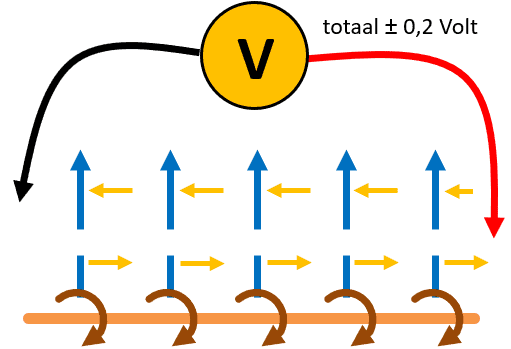
When CAN high and CAN low are implemented as a twisted pair, both wires experience the same induced voltages from an external current-carrying cable. Because the wires are twisted, which wire is closest to the interference source continuously changes. As a result, the induced voltages largely cancel each other out and the original signal is preserved better.
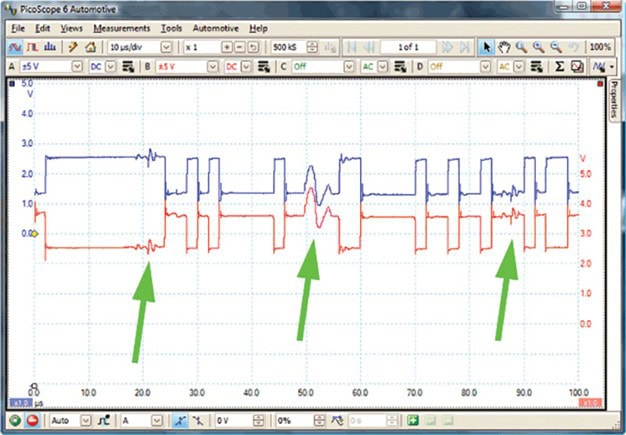
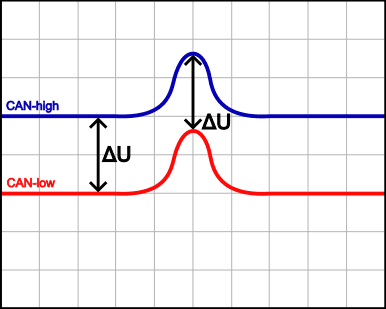
The scope display below shows how twisted-pair wiring prevents interference. Because the induced voltages occur at the same level in both channel A (blue) and channel B (red), the voltage difference (ΔU) remains equal to zero. The image confirms this: during the voltage spike, ΔU remains the same as during the normal signal pattern.
Without twisted pair, the red spike can be inverted, doubling the voltage difference (ΔU) and unintentionally being detected as a bit.
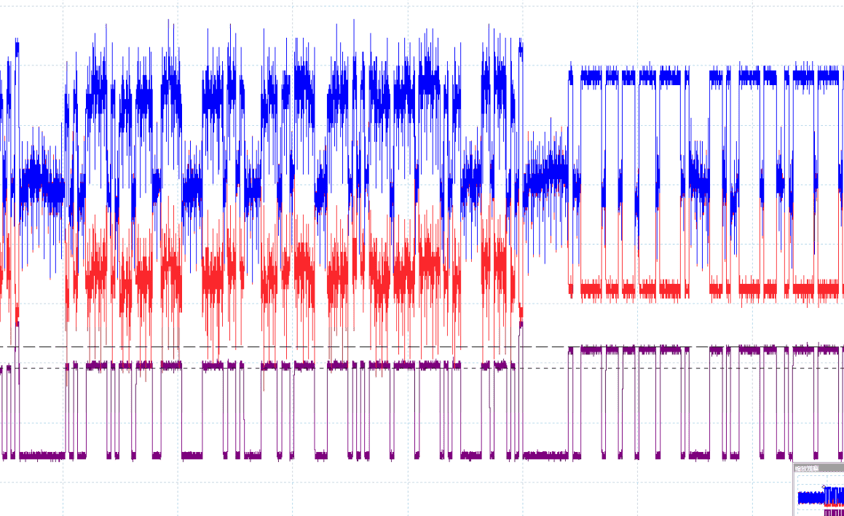
A signal with a lot of noise is hardly assessable visually. It is clear that in this example there is interference at an ECU or in a part of the network, causing so much noise. In the next data block on the same scope display, the signal pattern is normal. With the math channel (purple), the differential voltage between channels A and B can be displayed. This channel shows a correct pattern. From this we can conclude that twisted pair ensures that, despite the strong noise, a reliable signal is maintained because no unintended voltage differences occur. The noise therefore has no influence on data communication. This keeps the bits readable, even when the signal quality at first glance seems completely lost.
Termination resistors:
In every high-speed CAN bus network, termination resistors are used. They are often located in the nodes at the ends of the CAN bus line (wire) or integrated into the wiring. Each of these resistors has a resistance of 120Ω (ohms). The equivalent resistance is measured as 60Ω when measuring resistance across the wires.
These termination resistors are used for interference suppression; if they were not present, reflection would occur. The voltage signal travels through the CAN bus wire, reaches the end, and reflects back. That is prevented. The voltage is absorbed by the resistor. Reflection could cause voltage signals to bounce back, which could affect transmitted messages and then put the control modules into a fault state.
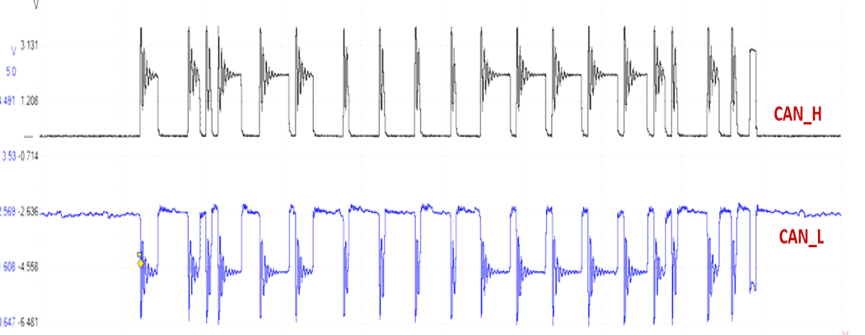
The image below shows the signal pattern of CAN high and low with many oscillations/reflections visible in the signal. The reflections occur because parts of the signal bounce back at the point where termination is missing, due to missing or defective termination resistors. This causes overshoot, undershoot, and ringing, as visible in the scope display. The worse the termination, the greater the reflection and the more unreliable the signal. As a result, the signals no longer reach the ECUs reliably.
Gateway:
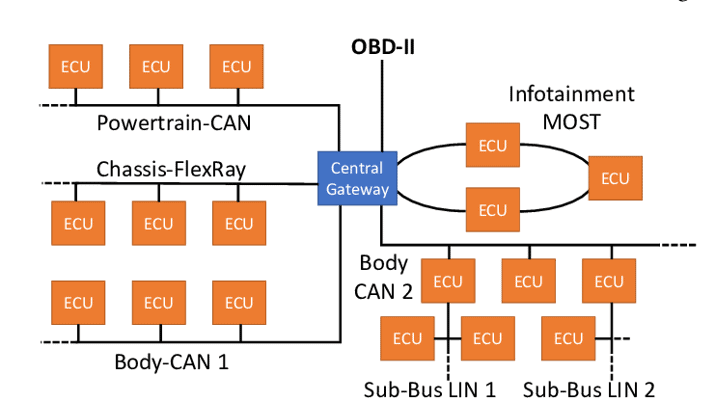
The vehicle is equipped with a network of control modules (nodes). The gateway connects various CAN bus networks (think of the interior, the engine/transmission, and the chassis), the MOST bus, LIN bus, and FlexRay, allowing all networks to communicate with each other. So it is essentially a hub between all networks. The differences in speed between the networks are unimportant for a gateway. Click here to go to the page where the operation and functions of the Gateway are described.
CAN bus diagnostics:
Using a multimeter and an oscilloscope, a diagnosis can be made by measuring the resistance or the voltage levels on the wires. Read all about it on the page CAN bus diagnostics.
Related page: