Introduction:
A lot of measurements are made in engineering and technology. This page discusses measurement as it relates to automotive technology. In automotive technology, measurements can be taken in many different ways, such as during development, testing, monitoring processes, and troubleshooting faults. Once you know how to measure, all you still need is reference material (wiring diagrams) to determine where to measure.
The most commonly used (electrical) measuring equipment in automotive technology is:
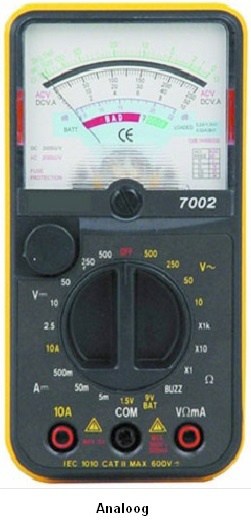
- The multimeter / analog meter: This is used to measure voltage (U), current (I), and resistance (R). The digital multimeter shows the value on the LCD display, and the analog meter indicates the measured value on an underlying scale using a needle.
- The oscilloscope: An oscilloscope measures voltages that can be recorded on a timeline. This timeline can be adjusted (number of volts on the Y-axis and the time base on the X-axis).
Analog meter:
The analog meter (moving-coil meter) consists of a permanent magnet and a moving coil. The current flowing through the coil creates a magnetic field. The forces that the magnetic fields exert on each other cause the moving coil (with the pointer mounted on it) to rotate. The higher the current (and therefore the magnetic field), the further the pointer will deflect.
Advantages compared to the digital multimeter:
- Inexpensive;
- More accurate below 10 Hz (not above that).
Disadvantages:
- Harder to read;
- Relatively slow due to the moving pointer.
Digital multimeter:
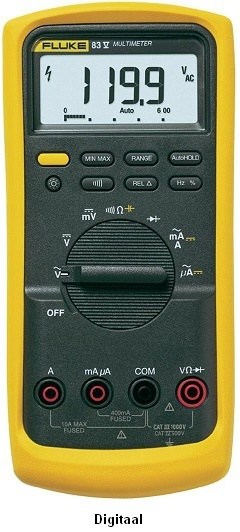
The digital multimeter is a replacement for the analog meter. These meters continue to be further developed (in accuracy, speed, and functions). The multimeter contains an A/D converter. The analog signal being measured is processed first before it is displayed. This processing depends on the selected function (volts, amperes, ohms, etc.). The digitized signal is then sent to the display. The speed at which this happens is called the “response time,” which can be found in the meter specifications. The response time (of the A/D converter) is the time needed to register a change in the input signal. The more expensive the meter, the lower this response time will be.
There are digital multimeters with manual and automatic range selection. This sets the measuring range. The multimeter in the image below does this automatically. The chapter “Measuring range” is described later on this page.
Resolution:
The number of digits displayed by multimeters determines the resolution and therefore the readability/accuracy of the meter. Resolution only relates to the display and not to the measuring range. There are 3½, 3¾, and 4½ digit multimeters. The more digits the multimeter can display, the more values are possible (so the measurement is more accurate).
3½ digit:
This is a standard multimeter, which in the 200 V range can measure with a maximum accuracy of 0.1 V. If a measurement is taken where the actual voltage would be 22.66 V, the meter would indicate 22.6 V.
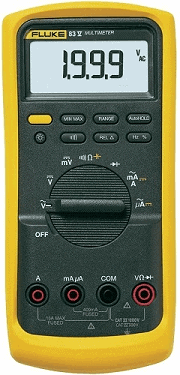
3¾ digit:
With this multimeter, the resolution has increased by a factor of 10, and with the same measurement (22.66 V with the 3½ digit multimeter) it will actually display 22.66 V. That is one hundredth of a volt more (and therefore more accurate).
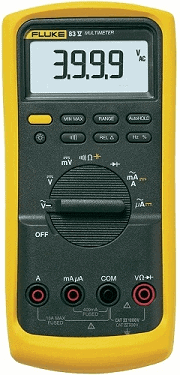
4½ digit:
This multimeter has an extra digit available in all ranges. The resolution has increased again by a factor of 10.
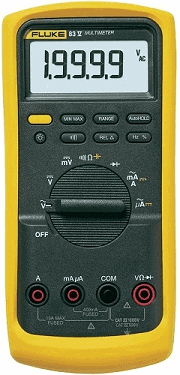
Setting the measuring range:
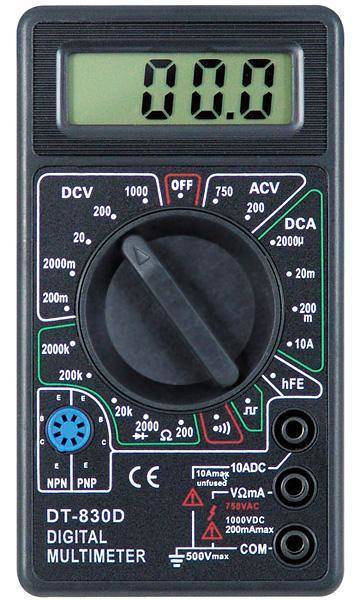
The measuring range of the multimeter below can be set manually. This is necessary to get the most accurate result possible for each measurement. When measuring battery voltage, it is best to choose the 20 DCV option. The battery voltage will be displayed, for example, as 12.41. It is best to select a measuring range that is just above the maximum expected measurement result. For example, battery voltage will never be higher than 99 volts. If a larger range were selected (200 DCV), the battery voltage would be displayed as 12.4 (less accurate). This is related to the resolution:
| Range: | Resolution: |
| 200 mV | 0.1 mV |
| 2 V | 0.001V |
| 20 V | 0.01 V |
| 200 V | 0.1 V |
| 2000 V | 1 V |
Examples from this table:
- When measuring a voltage of 100 volts in the 200 V range, the meter will display 100.1 V. When this same voltage is measured in the 2000 V range, the meter will display 100 V (less accurate).
- When measuring a voltage of 9.188 volts in the 2 V range, the meter will display 9.188 V. When this same voltage is measured in the 200 V range, the meter will display 9.2 V (rounded, so less accurate).
The most accurate measurement therefore depends on which measuring range is set and on the resolution of the display. With displays that have a low resolution, the most accurate voltage still cannot be displayed, even with a precise measuring range.
On the multimeter shown, the measuring range can only be adjusted manually. More advanced multimeters also have an “Autorange” button, where the meter itself selects the best measuring range (based on its own resolution). With basic multimeters, you can often only select the mode (volts, amperes, etc.), and the measuring range is often set to 20 V by default (so with a resolution of 0.01 V).
Another issue is that there is always some deviation in the meter. When setting a resolution that is too low, the deviation is greatest. More about this in the next chapters, “Absolute and Relative errors,” later on this page.
Calculating absolute error:
Every multimeter has a certain accuracy. This accuracy can be found in the specifications (in the manual). Using this data, the deviation of the measurement can be calculated. Two concepts can be calculated: the “absolute error” and the “relative error.” The absolute error is expressed as voltage in volts, and the relative error is calculated as a percentage.
Example:
Voltage (U) = 12.55 V
±(0.3% rdg + 1d)
rdg = reading = the value read on the display (the measured value)
1d = 1 digit = the resolution (in the 20 V range, 1 digit corresponds to 0.01 V, and in the 2 V range to 0.001 V).
The actual voltage is 12.55 volts. This is measured in the 20 V range.
0.3% rdg is 0.3% of 12.55 V = 0.038 V.
In the 20 V range, 1d = 0.01 V.
The total absolute error is then: the reading + 1 digit = absolute error. In numbers: 0.038 + 0.01 = 0.048 V
The final answer with the absolute error is:
U = 12.55 ± 0.05 V.
That means the measurement is somewhere between 12.50 and 12.60 volts.
Cheap multimeters often have a larger deviation than more expensive ones, so the total absolute error is also larger. This therefore proves that “cheap multimeters” cannot perform accurate measurements.
Calculating relative error:
When the absolute error is calculated as a percentage of the reading, this is called the relative error. This relative error is usually used when comparing meters.
The relative error for the previous multimeter is: total absolute error / (divide by) the actual voltage x (multiply by) 100% = the relative error.
In numbers: U = 0.038 / 12.55 x 100 = 0.30%.
The final answer with the relative error is:
U = 12.55 ± 0.3%.
12.55 V minus the 0.3% gives an answer of 12.50. Plus 0.3% is then 12.60. This is the same as what was calculated with the absolute error, but expressed as a percentage.
Measuring with the multimeter:
Voltage, current, and resistance are all measured in different ways. How to correctly measure with the multimeter is explained with examples on the page measuring with the multimeter.
Measuring with the oscilloscope:
An oscilloscope (abbreviated as scope) is a graphical voltmeter. The voltage is displayed graphically as a function of time. The scope is also very accurate. The time base can be set so small that signals coming from sensors such as the oxygen sensor or actuators such as an injector can be displayed perfectly.
How to measure with the scope is explained on the page measuring with the oscilloscope.